
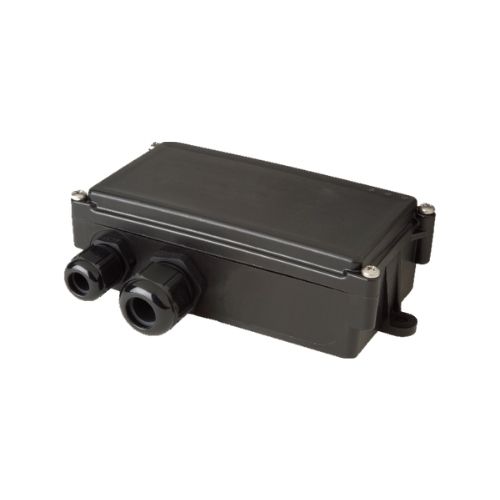


The SBC product family (including SBC3 CAN 4G and SBC AVL 4G) delivers a rugged telematics platform designed for fleet management and vehicle tracking and is Green-Gps compatible out of the box. Built for quick installation and reliable long-term operation, SBC devices combine LTE Cat M1 connectivity and multiple wired interfaces so fleets and asset managers can enable real-time tracking, telemetry, and integration with Green-Gps dashboards and automation rules.
Whether you deploy SBC units for trailer telematics, automatic production data acquisition, or mixed-vehicle fleets, the family gives you a stable hardware base for anti-theft workflows, fuel monitoring analytics, and broader fleet telemetry use cases. The SBC family’s robust housing and integrated antenna simplify mounting in varied positions while preserving consistent uplink for Green-Gps real-time tracking and reporting.
Key Highlights
- Green-Gps compatible — designed to stream telematics over LTE Cat M1 for real-time tracking and centralized fleet management.
- LTE Cat M1 connectivity to balance coverage and low-power IoT communication across wide-area networks.
- Multiple wired interfaces (CAN bus, 1-Wire, RS232) for deep telemetry capture from vehicle systems and sensors.
- Robust housing and integrated antenna to support quick installation and dependable operation in vehicle and trailer environments.
- Optimized for fleet management workflows including route visibility, maintenance telemetry, and anti-theft monitoring.
- Suitable for automated production data acquisition — ideal where vehicle or asset signals need to be recorded and acted upon.
- Scalable platform: deploy single units or roll out across an entire fleet while maintaining Green-Gps compatibility for reporting and alerts.
How It Works with Green-Gps
Integrating SBC devices with Green-Gps connects vehicle and asset telemetry to a cloud-based control plane for real-time tracking, alerts, and historical reporting. SBC units transmit data over LTE Cat M1; Green-Gps ingests that stream and maps CAN/serial/1-Wire signals to dashboards, geofences, and operational rules. This enables live position updates and telemetry-driven automation within your Green-Gps account.
- Real-time tracking: location updates sent over LTE Cat M1 feed Green-Gps for live map views and route replay.
- Vehicle telemetry via CAN bus: SBC devices expose engine and vehicle bus data so Green-Gps can surface fuel monitoring, RPM, and other CAN-provided metrics when available from the vehicle network.
- Sensor integration: 1-Wire and RS232 interfaces allow Green-Gps to record ancillary sensors and production data from connected devices.
- Anti-theft workflows: combine real-time position with CAN-derived status to create alerts and immobilizer-like actions through Green-Gps when integrations or external hardware support control functions.
- Correlated sensor data: Green-Gps can combine SBC telemetry with external Bluetooth sensor feeds or other sources in your platform to support temperature monitoring, asset movement detection, and compliance reports.
Technical Overview
| Product family / Models | SBC product family (including SBC3 CAN 4G and SBC AVL 4G) |
|---|---|
| Connectivity | LTE Cat M1 |
| Bands | Not specified in provided description (model-dependent) |
| Power & Battery | Not specified in provided description |
| Interfaces | CAN bus, 1-Wire, RS232 (various interfaces across family) |
| GNSS | Not specified in provided description |
| Bluetooth | Not specified in provided description |
| Remote Management | Not specified in provided description |
| Form Factor | Robust housing with integrated antenna; compact for flexible mounting positions |
Use Cases
- Fleet management and route visibility — monitor vehicles in real time with Green-Gps for scheduling and operational efficiency.
- Anti-theft and security workflows — enable alerts and location tracking to respond quickly to unauthorized movement; integrate immobilizer or control functions where vehicle CAN or external hardware allow.
- Trailer telematics — track unpowered trailers and log sensor or production data through wired interfaces and Green-Gps reporting.
- Fuel monitoring and engine telemetry — extract fuel-level, consumption, and engine signals from CAN bus to feed Green-Gps analytics and reduce fuel spend.
- Automatic production data acquisition — capture serial or 1-Wire signals from machines or vehicle-mounted devices for aggregate analysis in Green-Gps.
Why Choose This Tracker with Green-Gps
Choosing an SBC device for Green-Gps integration gives you a rugged, IoT-optimized base for GPS tracker and telemetry needs. LTE Cat M1 delivers a reliable uplink ideal for continuous real-time tracking while the family’s CAN, 1-Wire, and RS232 interfaces let you extract meaningful telemetry — from fuel monitoring to production counters — that Green-Gps can convert into actionable insights. The durable housing and integrated antenna reduce installation time and increase uptime, so fleet managers achieve faster ROI and clearer operational visibility.
In short, the SBC product family is a solid fit where Green-Gps-compatible hardware must support mixed telematics use cases: real-time tracking, fleet management, anti-theft detection, and advanced telemetry collection. For deployment details, device templates, and the specific interface mapping supported by each model (SBC3 CAN 4G, SBC AVL 4G), consult the manufacturer’s datasheets and your Green-Gps device configuration guide to ensure optimal integration and to enable ignition, immobilizer, or Bluetooth sensor workflows where vehicle signals or auxiliary hardware permit.
Set Up SBC product family
To set the tracker send the following commands by SMS messages, the sample setup the device password is eNyeWZ, this password is the default
- Factory reset
begineNyeWZ - Set the time zone UTC-0
time zoneeNyeWZ 0 - Set the operator APN
apneNyeWZ {{apn}} - Set the username and password of APN operator
upeNyeWZ {{apnu}} {{apnp}} - Set the GPRS server
adminipeNyeWZ 54.85.159.138 8888 - Switch to GPRS mode
8CBnhoqc2X,1,1
or
8CBnhoqc2X
To check settings checkeNyeWZ